
Microsoft Agent 365 reaches general availability on 1 May 2026. That is two days away as we publish this. If you have any kind of AI agent estate building up across Copilot, Copilot Studio, Power Platform, or third-party agents — and most mid-market tenants do, whether IT signed off on it or not — this is the moment to plan how those agents will be governed.
The honest position for most organisations right now is this: agents are appearing faster than the controls around them. A finance team builds a reconciliation agent in Copilot Studio. A sales operations lead deploys a third-party SDR agent. A developer pilots an autonomous code reviewer. Each one looks small. Stacked together, they create an environment where nobody can answer two basic questions: which agents are running, and what data are they touching.
Agent 365 is Microsoft's answer to that. It is not a new agent. It is the management layer that brings every agent — built in-house, bought from an ISV, or acquired through an M365 plan — under one identity, security, and governance regime.
The core idea: every AI agent gets its own Microsoft Entra identity, the same way every user and every device already does. That identity is the hook everything else hangs from — registry, access control, audit, threat protection, data governance.
Strip away the marketing and Agent 365 is doing four things that did not previously exist in a coherent form.
It gives every agent an Entra Agent ID. This is the single most important shift. Agents stop being anonymous processes running in someone's tenant and become first-class identities — discoverable, assignable, revocable. Identity is the foundation that makes everything else possible.
It surfaces agents in the Microsoft 365 admin center. Administrators get a registry that includes agents with formal Agent IDs, agents the organisation has registered itself, and — critically — shadow agents that have appeared in the tenant without being explicitly onboarded. This last category is the one most IT leaders underestimate.
It plugs into Microsoft Purview and Microsoft Defender. Purview applies data protection and audit policies to agent activity, the same way it does for users today. Defender detects, investigates, and responds to threats targeting agents, including risky agent behaviour and data oversharing.
It gives developers a unified SDK. Developers building agents can use a consistent set of MCP-style interfaces to integrate with Outlook, Teams, SharePoint, and line-of-business systems. The agents they build inherit Agent 365's security and compliance posture by default rather than bolting it on later.
If you have run a Microsoft 365 tenant for any length of time, the pattern will be familiar: identity in Entra, governance in Purview, threat response in Defender, manageability in the admin center. Agent 365 simply extends that established stack to a new class of principal.
Microsoft has structured Agent 365 around five distinct roles. Each one comes with a different surface area inside the platform — and different decisions a mid-market business has to make. Below is what each role actually sees and gets.
The IT admin lens is the day-one one. The new Agent overview page in the Microsoft 365 admin centre is a working dashboard, not a marketing screenshot. It surfaces five hero metrics on a rolling 30-day window:
Below the hero metrics, two analytics views answer the questions IT leads actually get asked: a breakdown of agents by publisher (your organisation versus external partners) and by creation platform (Copilot Studio, Microsoft Foundry — formerly Azure AI Foundry — or external partner platforms), plus a daily active-users trend chart. There is also a Top governance actions strip that highlights pending agent requests awaiting admin approval and ownerless agents needing a sponsor assigned.
The admin centre is the place IT teams will spend most of their Agent 365 time, particularly in the first ninety days of rollout when shadow agents are being identified and brought under governance.
The security lens is broader than most people expect. Microsoft has organised Agent 365's security model around six distinct capability areas, each plugging into a tool security teams already operate:
The substantive design choice here is that Agent 365 doesn't introduce a new security UI. Security teams act on agent-specific signals from inside the same Defender, Entra, and Purview consoles they already use. That is the difference between AI security being a project and AI security being a routine operational discipline.
The developer lens is the one that most surprised us reading through the documentation. The Agent 365 SDK does not create or host agents. It is a compatibility and enrichment layer that sits on top of agents you've already built, regardless of the framework or hosting environment.
The supported framework list reads like an ecosystem map rather than a Microsoft-only one: Copilot Studio, Microsoft Foundry, Microsoft Agent Framework, Microsoft Agents SDK, OpenAI Agents SDK, Claude Code SDK, and LangChain SDK. Hosting can sit on Azure, AWS, GCP, or any other cloud. What the SDK adds is the enterprise plumbing — Entra-backed Agent Identity, OpenTelemetry-based observability, MCP-governed access to Microsoft 365 workloads (Mail, Calendar, SharePoint, Teams, Word, Excel), and notification handling so the agent can respond to @mentions and emails like a human participant.
There is also an Agent 365 CLI that handles the development lifecycle — creating agent blueprints, configuring MCP servers and permissions, deploying code to Azure, publishing the agent application package to the M365 admin centre, and tearing down resources when the agent is retired.
The architecture in three lines: Enterprise capabilities (Agent 365 SDK — identity, observability, tooling, notifications) sit above Agent logic (your code) which sits above the LLM orchestrator runtime (the agent framework or platform you chose). Agent 365 lets you keep the framework you like and inherit Microsoft's enterprise stack on top.
For business leaders, Agent 365 introduces the agent template as the unit of governance. Templates are pre-configured definitions Microsoft, partners, or your own developers publish into the catalogue. They define an agent's capabilities, identity, compliance settings, and licensing requirements before any user creates an instance.
The end-to-end flow is straightforward:
This template-and-request pattern is the assurance layer business decision makers asked for. It means individual employees can adopt agents that suit their work without bypassing IT. Pausing or deleting an agent is also user-driven; tenant admins retain the same controls in the admin centre. Note that resources associated with a deleted agent are retained for thirty days — useful if a user pauses something they later want back.
The end-user lens is the most genuinely different from anything Microsoft has shipped before. Agents in Agent 365 are configured by conversation in Teams.
Once an agent is created, it gets in touch via a Teams chat message when it is ready (which can take a few hours after creation — a quirk worth knowing). The configuration happens through that chat using four building blocks:
Drafts to the playbook and guidelines stay in draft until the user types "apply". Test runs happen inside 1:1 Teams chats. Going live is literally typing "Go live". The reference example in Microsoft's documentation is the Sales Development agent, which automates outreach and prospect management end-to-end and is currently in Targeted Release.
A risk Microsoft itself documents: Content shared with an agent — files, chat history, emails — may be summarised or included in agent responses to other users, even those who didn't originally have access to it. This applies regardless of sensitivity labels or permissions on the source content. This is not an Agent 365 design flaw; it is the inherent shape of agent collaboration. The mitigation is data classification discipline plus Purview policy: don't hand an agent material whose downstream summarisation you can't accept.
Microsoft groups the platform's capabilities into five pillars. These are the buckets you will see in the admin centre and in licensing conversations.
A complete view of every agent in your tenant. That includes agents that have a formal Entra Agent ID, agents you have registered yourself, and shadow agents that have appeared in the tenant without explicit onboarding. The registry is the starting point for any governance conversation — you cannot manage what you cannot see.
Conditional-access-style policies applied to agents. Bring agents under management, scope their access to only the resources they actually need, and use risk-based conditional access to prevent compromise. The mental model is identical to the one already in use for users — least privilege, just-in-time access, conditional triggers.
A graph view of how agents connect to people, data, and other agents. This helps administrators understand exposure: if a customer-service agent is talking to a finance agent that touches the general ledger, the chain matters. Visualisation also covers performance and behaviour monitoring in real time.
Tooling and connectors that let agents integrate with apps and data via consistent interfaces. The goal is to avoid the bespoke-integration sprawl that historically follows every new automation tool. Agents connect into Microsoft's Work IQ to inherit organisational context — your business processes, your terminology, your data hierarchy.
Threat protection specifically tuned for agents — both protecting agents from attack and protecting your data from agents misbehaving. Detection and remediation of attacks that target agents, plus controls for oversharing, data leaks, and risky agent behaviour, all delivered through the Defender stack.
Until 1 May 2026, Agent 365 is delivered through Microsoft's Frontier preview programme. Frontier is how Microsoft gives Copilot customers early access to its newest AI capabilities, with the understanding that features may evolve before general release.
There are two hard prerequisites. First, your tenant needs at least one Microsoft 365 Copilot licence — Frontier features are gated behind this. Second, you need to have agreed to the Agent 365 terms of service, which apply on top of your existing customer agreement.
The Microsoft 365 Copilot licence itself is an add-on that requires an eligible base plan: Microsoft 365 Business Premium, E3, E5, or another supported plan. If you do not see Copilot Frontier in your admin centre, the most common cause is missing one of these foundations.
The enrolment path is straightforward once the licensing is in place:
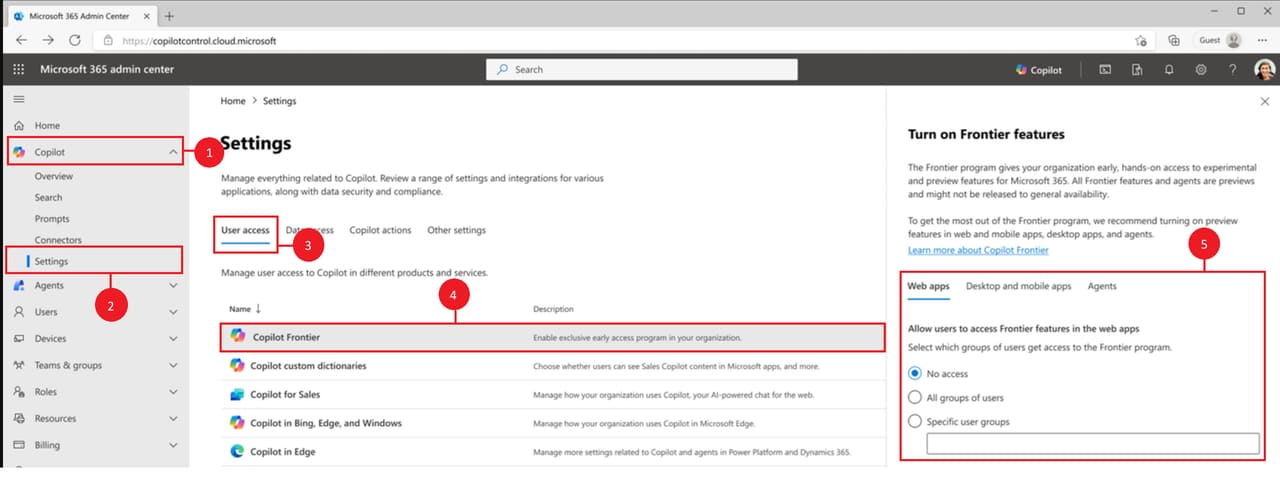
Source: Microsoft Learn — Microsoft Agent 365 overview.
Once Frontier is enabled, navigate to Agents from the left pane in the same admin centre. You may be prompted to accept the Agent 365 terms of service. After that, the registry and onboarding flows are available.
If you want to confirm enrolment, go to Billing then Licences in the admin centre. You should see twenty-five Microsoft Agent 365 Frontier licences listed. These are preview-tier per-agent-instance licences — the model that changes at general availability.
Frontier configuration changes can take up to an hour to propagate. If a developer hits a Frontier access denied error from the Agent 365 CLI shortly after you change settings, that is usually why. Toggling the setting back to Specific users or No access and then back to All users is the documented workaround.
Licensing is the area where most mid-market IT leaders need to plan ahead, because the model changes meaningfully between preview and general availability.
Inside the Frontier preview, Agent 365 is licensed per agent instance. Every agent your organisation runs needs an Agent 365 licence assigned before it can be created. This works for the small-footprint pilots that Frontier is designed for, but it does not scale.
From general availability on 1 May 2026, Agent 365 becomes a per-user licence. Any agent acting on behalf of a licensed user — directly or indirectly — is covered under that user's Agent 365 or Microsoft 365 E7 licence. Agents themselves do not need their own licence at GA.
This is the more important detail than it sounds. If you have, say, eighty knowledge workers who will each be using a handful of agents across finance, sales, and operations, you license the eighty users — not the four hundred agent instances they collectively interact with. It changes the budgeting conversation entirely.
Microsoft 365 E7 includes Agent 365 alongside the rest of the E7 stack, so for organisations on enterprise plans there may be a clean upgrade path that bundles the licence with broader productivity and security entitlements.
If you run IT, security, or finance at a UK mid-market organisation, here is the practical prep that pays off in the days either side of general availability.
Audit the agents you already have. Before you turn on Agent 365, get a list of every agent — Copilot Studio agents, third-party agents, custom-built agents, ISV agents — that runs against your tenant today. The list will surprise you. The shadow registry inside Agent 365 will surprise you more. Better to have your own picture first.
Identify your Copilot baseline. Confirm which users and groups have Microsoft 365 Copilot licences and which base plan they sit on. This determines who can access Frontier and, after 1 May, who is covered by per-user Agent 365 licensing. If your Copilot footprint is patchy, the cleanup is worth doing now rather than during GA week.
Decide who owns agent governance. Identity, security, data governance, and platform are usually four different teams in a mid-market business. Agent 365 sits across all four. Pick a single owner — typically inside the IT or security function — who will run the registry, define access policies, and act as the escalation point when an agent does something unexpected.
Pick a small pilot. Do not enable agents everywhere on day one. Choose one well-bounded use case — month-end reconciliation, supplier email triage, IT support ticket classification — and run it inside Agent 365's governance from the start. Measure the time saved, the policy violations caught, the audit trail produced. Use that evidence to expand.
Get your Purview and Defender posture in order. Agent 365 inherits the policies you have configured in Purview and Defender. If those policies are thin, Agent 365 will faithfully apply thin policies. The investment in good data classification, sensitivity labels, and Defender configuration pays compound dividends once agents start operating against that policy framework.
The pattern Microsoft is establishing with Agent 365 is the same one it established two decades ago with Active Directory: every principal in the enterprise — human or otherwise — gets an identity, a lifecycle, an access boundary, and an audit trail. Agents are the newest class of principal.
For mid-market businesses, this is genuinely good news. The alternative — every agent vendor inventing its own admin console, its own audit format, its own access model — was the path the industry was visibly heading down twelve months ago. A consolidated control plane delivered through tools your IT team already operates is far cheaper, far safer, and far faster to roll out.
1 May 2026 is the date the per-user licensing model arrives. The Frontier preview is the place to land your first agents safely under governance before then. The work in the meantime — auditing what you have, deciding who owns what, lining up your data and threat-protection posture — is the work that determines whether agents become a productivity multiplier or a governance headache.
We help UK mid-market businesses through exactly this kind of programme. If Agent 365 enrolment, agent governance design, or your first managed-agent rollout is on your list for the next quarter, we would be glad to compare notes.
We help UK mid-market businesses enrol in the Frontier programme, design agent governance, and roll out the first wave of managed AI agents safely. Book a free discovery call to map your path.
Or call us directly: 01625 569 777