If you work with Dynamics 365 Finance & Operations, you know the ritual. You want
to look at how a table is used, or read a class, or check a security role — and
somehow that means spinning up a cloud-hosted dev box, opening Visual Studio,
and (if you want cross-references) restoring a multi-gigabyte DYNAMICSXREFDB
first. A five-minute question turns into an afternoon.
The latest release of FinOps Workbench — our free tool for the Dynamics 365
community — sets out to remove that tax. v1.0.16 adds a complete AOT
browser and a compiler-accurate X++ editor, and it does the whole thing
from an environment's metadata: no SQL Server, no DYNAMICSXREFDB restore, and
no Visual Studio.
Point FinOps Workbench at an environment and click Download metadata. In one
operation it downloads the environment's PackagesLocalDirectory, extracts it,
and builds a local object index — and every step resumes where it left off, so
the same button doubles as "continue where it stopped." Downloads go into a
shared source store: one download per application version, reused by every
environment on that build, so two sandboxes never fetch the multi-GB source
twice. Already have an extracted copy? Point at it with Browse folder….
Because the index is built by sweeping the metadata files themselves, the tree
holds the complete Application Object Tree — a stock application is around
240,000 metadata files, shown as roughly 180,000 objects. That includes the
pure-metadata types (security objects, menu items, EDTs and the like) that a
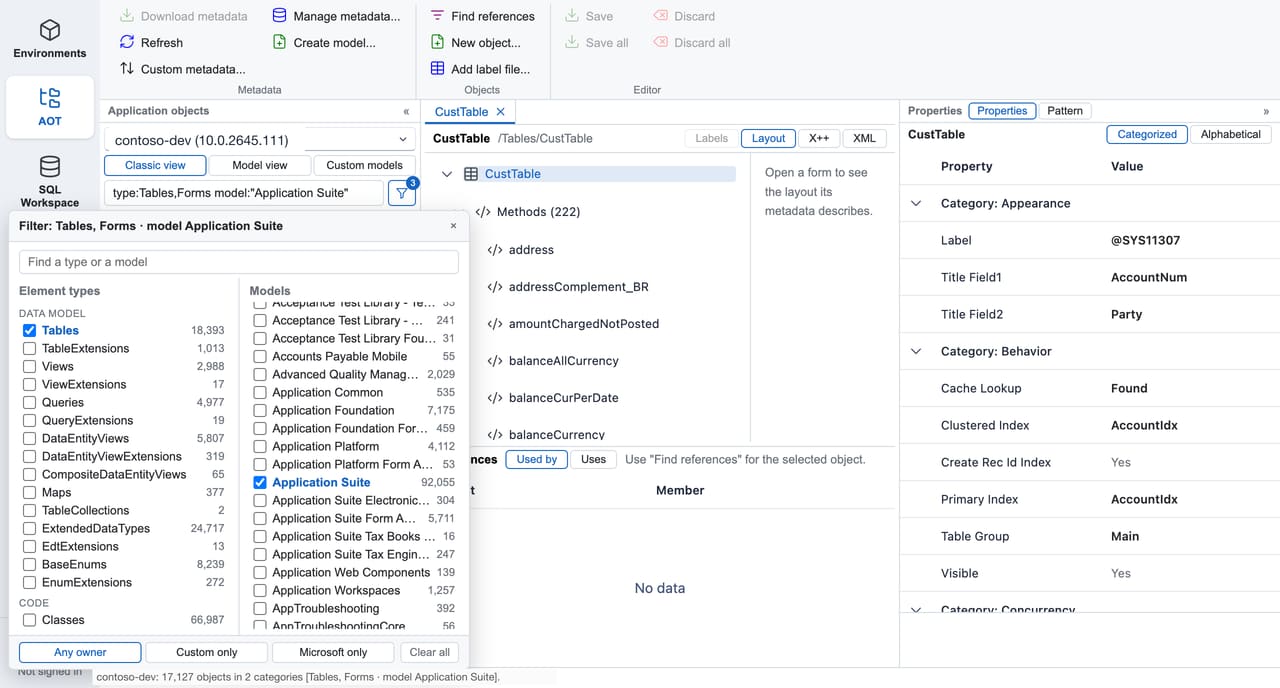
cross-reference database barely covers. Group it three ways — Classic,
Model and Custom models — and filter it by type and model with
type: / model: / custom:true facets (or a funnel panel), so you can jump
from 180,000 objects to just your own models in a keystroke.
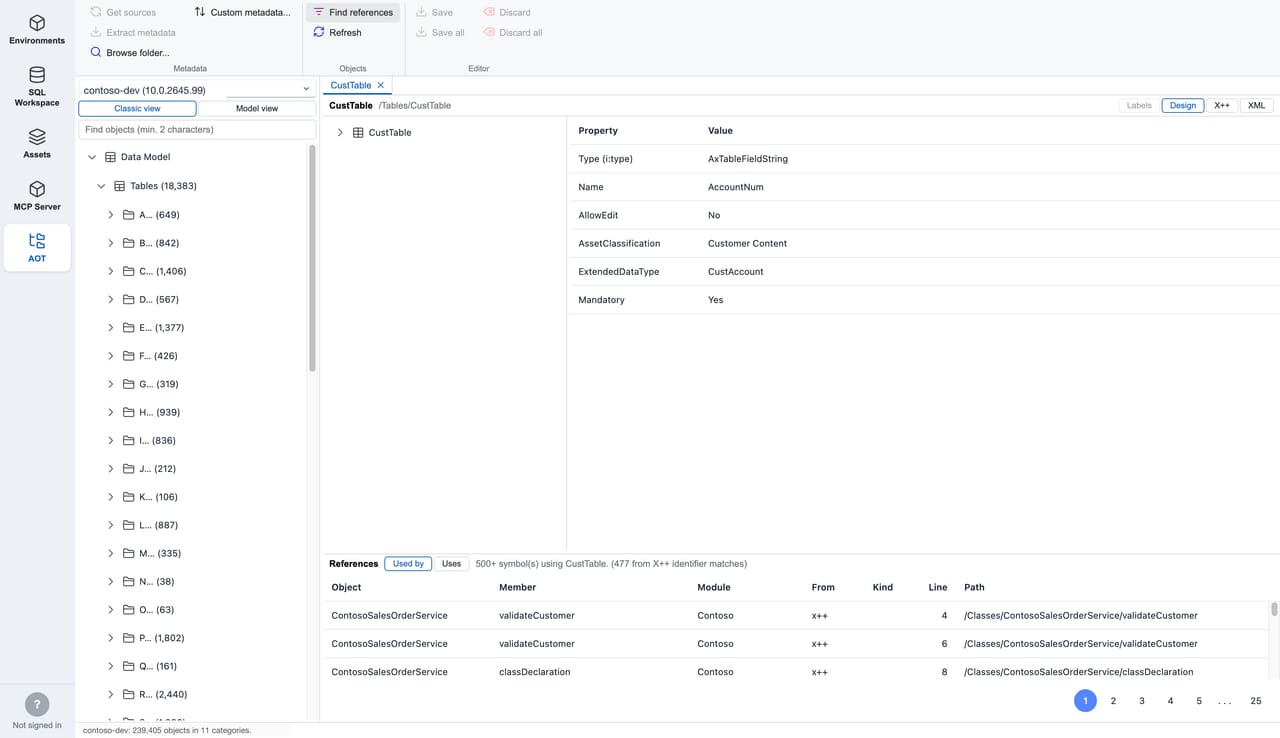
The feature that usually forces the DYNAMICSXREFDB restore — Find
references — works here straight from the local index. Select any object and
see what it uses and everything that uses it, and double-click a row to
jump to the referencing object. No SQL Server instance, no restore, no waiting.
On a stock CustTable, that is comfortably 500+ symbols resolved in a click.
That single change is the difference between "I'll check the xref later" and just checking it now.
Open any object and it lands in an X++ editor whose parsing is derived from the actual X++ compiler, not regex highlighting. Classes, interfaces, tables/views/entities, EDTs and enums are each coloured by what the index knows they are; keywords, literals, macros, intrinsics and labels all render like Visual Studio. Press F12 on any identifier to jump to that table, class, EDT or enum. Every object opens in its own tab that remembers its edits and cursor position — pin them, close others, the usual.
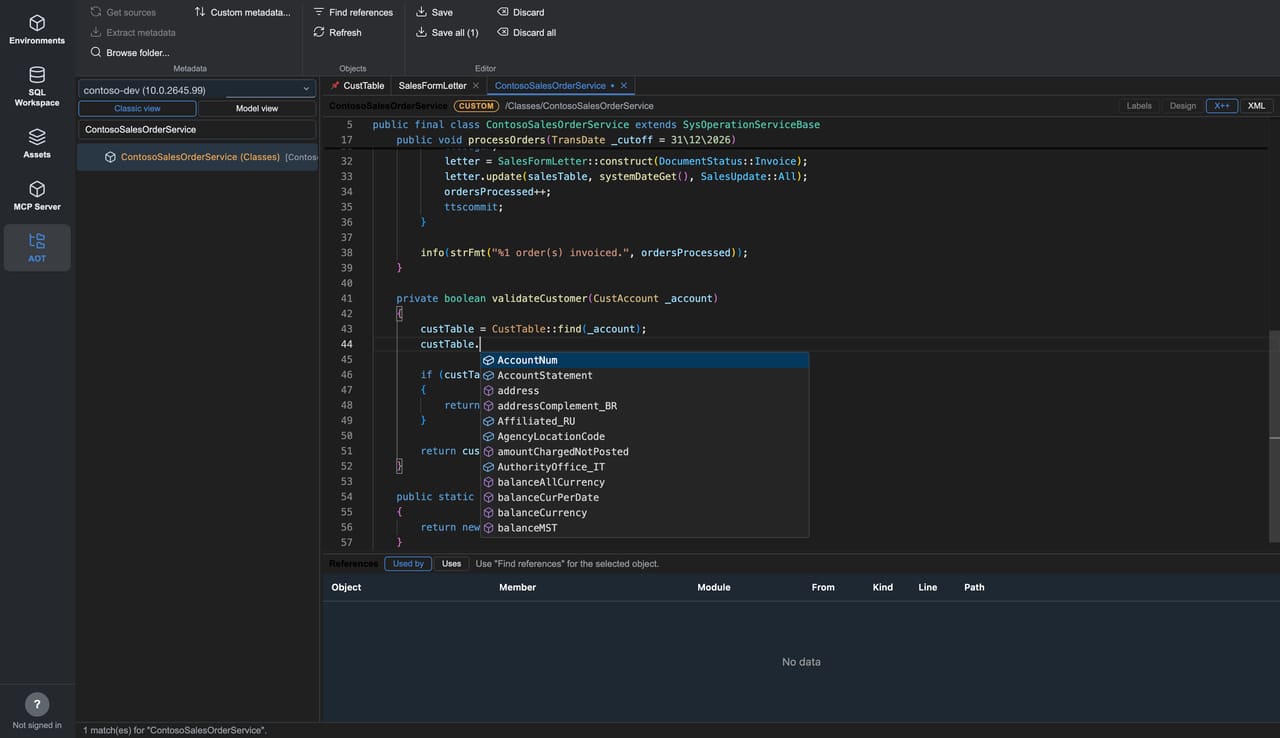
And you can edit your own models. Objects in a custom model are editable
right in the viewer (standard Microsoft code stays read-only), with
IntelliSense as you type: object names, your variables with their declared
types, Type:: static members and enum values, and variable. members resolved
through the type's full inheritance chain. Save writes your method changes
back into the metadata XML precisely — only the code you touched changes — so
the file diffs cleanly in Git.
To keep us honest: editing is for custom-model objects only, form data-source/control code is view-only for now, and the tool doesn't compile or deploy. It's for reading, understanding and making targeted code edits — fast.
X++ isn't the only thing you can edit. Labels in your own models are editable
right in the Labels grid — add, edit or delete label ids, with a column per
language so you can translate side by side, and + Add language to spin up a
new one. Save rewrites the .label.txt files exactly as Visual Studio does (UTF-8
BOM, CRLF, Id=Text with comments), so they drop straight into your repo.
And you can create new metadata: Create model… runs the familiar Visual Studio wizard and writes a descriptor byte-for-byte in the platform's own format, and Add label file… scaffolds a new label file in a custom model. Both land in your overlay folder and register into the index immediately — no re-index, and, again, no Visual Studio.
The AOT browser joins what FinOps Workbench already did: see your whole D365 estate (F&O, Customer Engagement, UDE, LCS and Dataverse) in one grid; request just-in-time SQL access and query any F&O/UDE database in a built-in SSMS-style workspace; download VHDs and LCS assets; trigger DB syncs; and drive the whole thing from Claude through a built-in MCP server. No dev box, no Visual Studio — and, yes, it runs on macOS as well as Windows.
It's free, it signs in with your own Microsoft account (no app registration, no client id or secret), and on Windows it's now a one-click install from the Microsoft Store with automatic updates.
FinOps Workbench is built and maintained by Veriland for the Dynamics 365 community — and opening up the source so the community can contribute is next. If you give it a go, we'd genuinely love your feedback.
FinOps Workbench is free for Windows and macOS. Download it, point it at an environment, and browse the AOT in minutes — or talk to the Veriland team about your Dynamics 365 delivery.
Or call us directly: 01625 569 777